REconnect Developer Guide
The following section is adapted from the DG of AY2425S2-CS2103T-T12-4.
The original author is: patil-np.
Acknowledgements
We would like to humbly acknowledge the following for the success of our project:
- The SE-EDU team for creating and maintaining the AddressBook-Level3 project.
- Our course instructors and teaching assistants whose patient guidance and feedback were instrumental throughout the development journey.
- Our peers and collaborators for their support, constructive code reviews, and insightful discussions.
- The open-source Java and JavaFX communities for providing comprehensive documentation and development tools.
- The developers and maintainers of essential libraries and frameworks used in this project, including Jackson for JSON processing and JUnit for testing.
- Special thanks to samuelneo for the idea of using emojis to represent phone and email.
Java Dependencies
- JavaFX - for Graphical User Interface (GUI) rendering
- Jackson - for JSON serialization and deserialization
- JUnit 5 - for JUnit testing
- Gradle Shadow Plugin - for creating executable JAR files with dependencies
- Checkstyle - for enforcing coding standards
Documentation Tools
- MarkBind - for authoring and building the project website
- PlantUML - for creating UML diagrams used in the Development Guide
Badges
- CodeCov - for providing code coverage badge
- GitHub Actions - for providing the Java CI badge
Setting up, getting started
Refer to the guide Setting up and getting started.
Design
Architecture
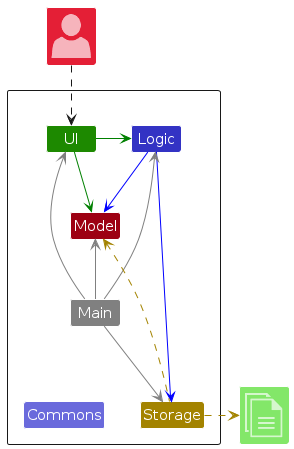
The Architecture Diagram given above explains the high-level design of the App.
Given below is a quick overview of main components and how they interact with each other.
Main components of the architecture
Main (consisting of classes Main and MainApp) is in charge of the app launch and shut down.
- At app launch, it initializes the other components in the correct sequence, and connects them up with each other.
- At shut down, it shuts down the other components and invokes cleanup methods where necessary.
The bulk of the app's work is done by the following four components:
UI: The UI of the App.Logic: The command executor.Model: Holds the data of the App in memory.Storage: Reads data from, and writes data to, the hard disk.
Commons represents a collection of classes used by multiple other components.
How the architecture components interact with each other
The Sequence Diagram below shows how the components interact with each other for the scenario where the user issues the command delete 1.
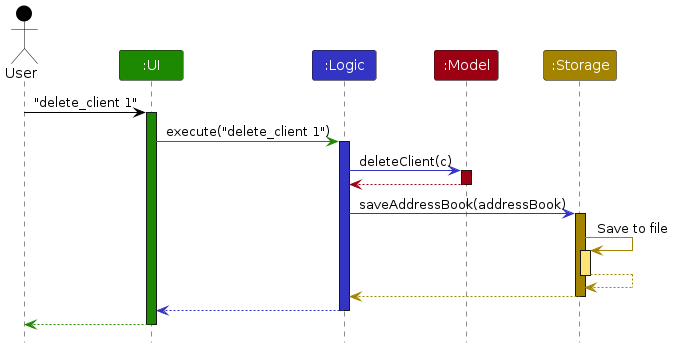
Each of the four main components (also shown in the diagram above),
- defines its API in an
interfacewith the same name as the Component. - implements its functionality using a concrete
{Component Name}Managerclass (which follows the corresponding APIinterfacementioned in the previous point.
For example, the Logic component defines its API in the Logic.java interface and implements its functionality using the LogicManager.java class which follows the Logic interface. Other components interact with a given component through its interface rather than the concrete class (reason: to prevent outside component's being coupled to the implementation of a component), as illustrated in the (partial) class diagram below.
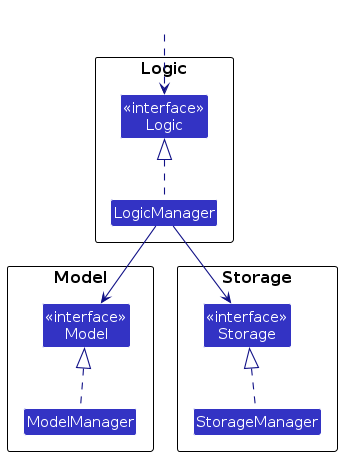
The sections below give more details of each component.
UI component
The API of this component is specified in Ui.java
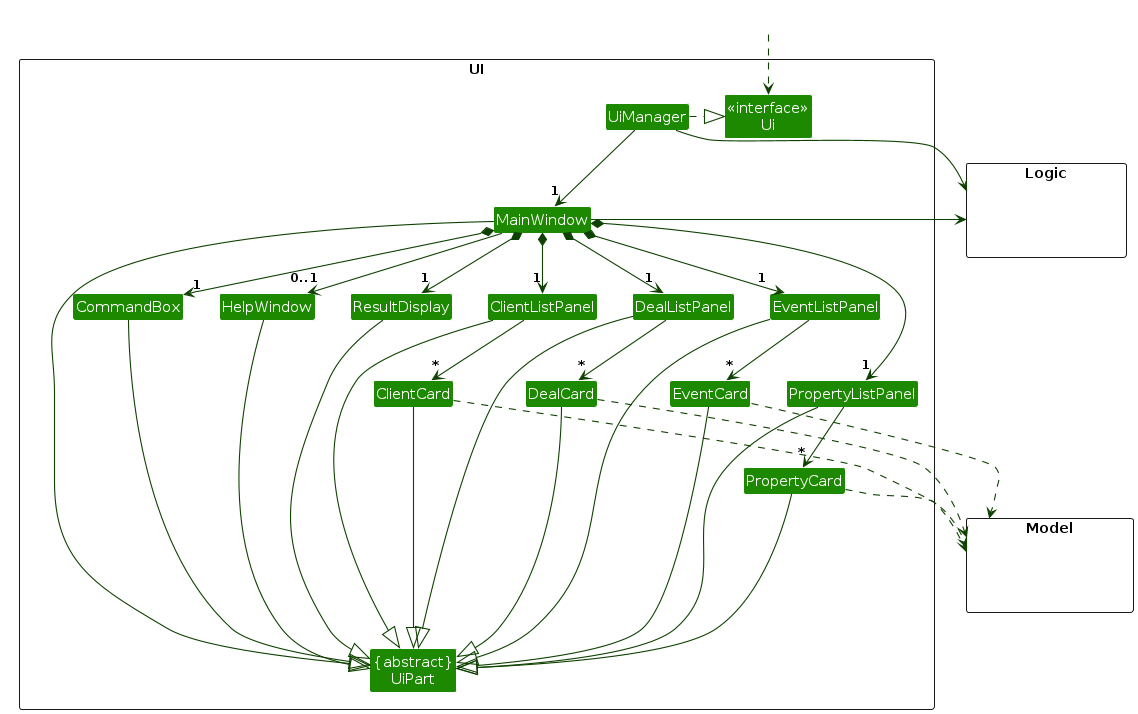
The UI consists of a MainWindow that is made up of parts e.g.CommandBox, ResultDisplay, ClientListPanel, PropertyListPanel etc. All these, including the MainWindow, inherit from the abstract UiPart class which captures the commonalities between classes that represent parts of the visible GUI.
The UI component uses the JavaFx UI framework. The layout of these UI parts are defined in matching .fxml files that are in the src/main/resources/view folder. For example, the layout of the MainWindow is specified in MainWindow.fxml
The UI component,
- executes user commands using the
Logiccomponent. - listens for changes to
Modeldata so that the UI can be updated with the modified data. - keeps a reference to the
Logiccomponent, because theUIrelies on theLogicto execute commands. - depends on some classes in the
Modelcomponent, as it displays theClientobject residing in theModel.
Logic component
API : Logic.java
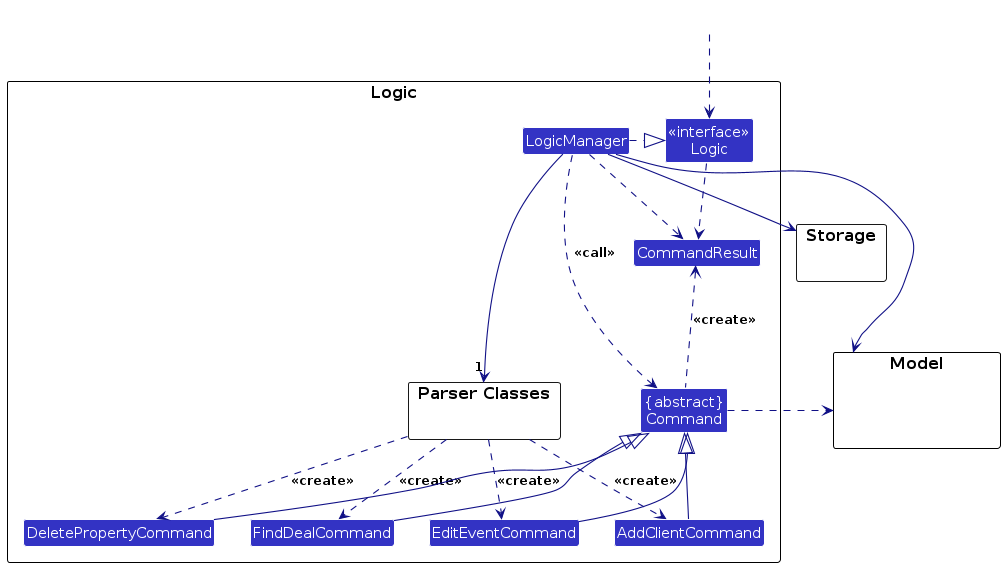
Here's a (partial) class diagram of the Logic component:
The sequence diagram below illustrates the interactions within the Logic component, taking execute("delete_client 1") API call as an example.
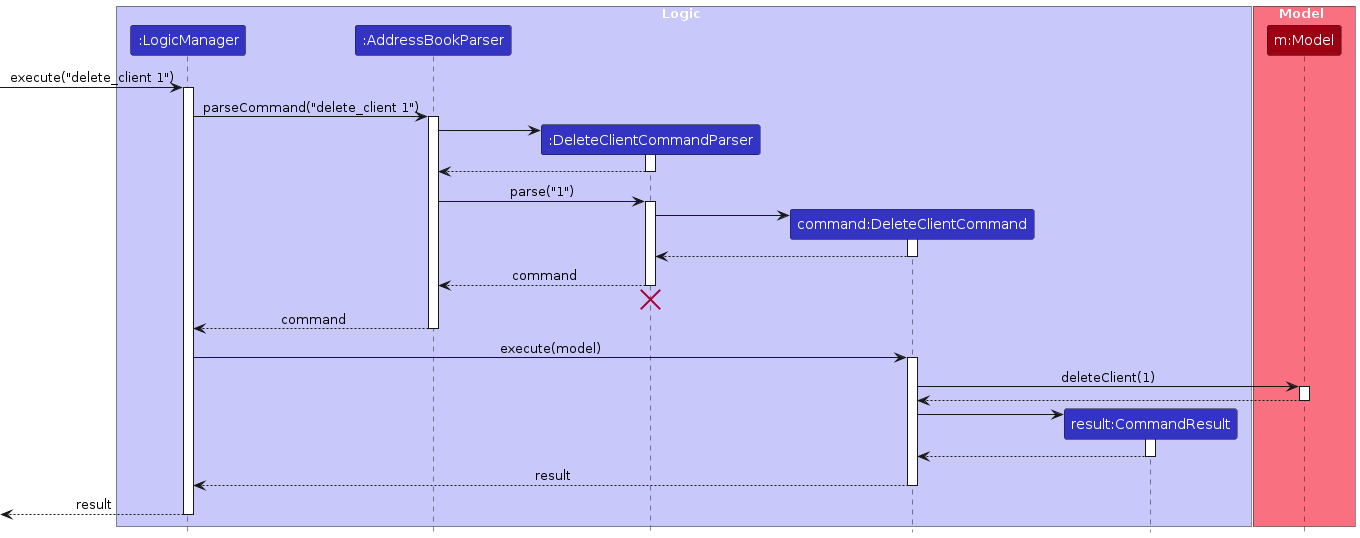
Note: The lifeline for DeleteClientCommandParser should end at the destroy marker (X) but due to a limitation of PlantUML, the lifeline continues till the end of diagram.
How the Logic component works:
- When
Logicis called upon to execute a command, it is passed to anAddressBookParserobject which in turn creates a parser that matches the command (e.g.,DeleteClientCommandParser) and uses it to parse the command. - This results in a
Commandobject (more precisely, an object of one of its subclasses e.g.,DeletClienteCommand) which is executed by theLogicManager. - The command can communicate with the
Modelwhen it is executed (e.g. to delete a client).
Note that although this is shown as a single step in the diagram above (for simplicity), in the code it can take several interactions (between the command object and theModel) to achieve. - The result of the command execution is encapsulated as a
CommandResultobject which is returned back fromLogic.
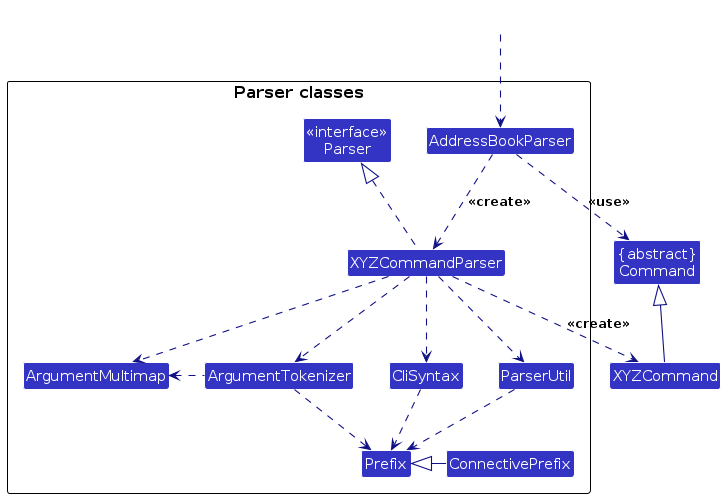
Here is the class diagram in Logic (omitted from the class diagram above) that is used for parsing a user command:
How the parsing works:
- When called upon to parse a user command, the
AddressBookParserclass creates anXYZCommandParser(XYZis a placeholder for the specific command name e.g.,AddClientCommandParser) which uses the other classes shown above to parse the user command and create aXYZCommandobject (e.g.,AddClientCommand) which theAddressBookParserreturns back as aCommandobject.- All
XYZCommandParserclasses (e.g.,AddClientCommandParser,DeleteClientCommandParser, ...) inherit from theParserinterface so that they can be treated similarly where possible e.g, during testing.
- All
Model component
API : Model.java
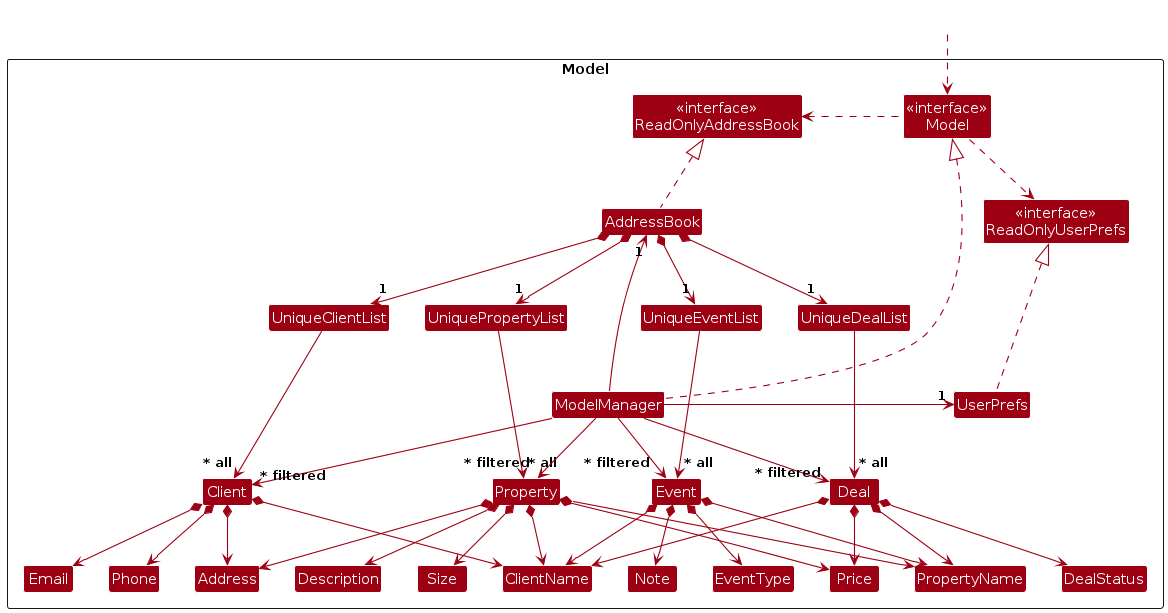
The Model component,
- stores the data stored in REconnect i.e., all
Clientobjects (which are contained in aUniqueClientListobject). - stores the currently 'selected'
Clientobjects (e.g., results of a search query) as a separate filtered list which is exposed to outsiders as an unmodifiableObservableList<Client>that can be 'observed' e.g. the UI can be bound to this list so that the UI automatically updates when the data in the list change. - stores a
UserPrefobject that represents the user's preferences. This is exposed to the outside as aReadOnlyUserPrefobject. - does not depend on any of the other three components (as the
Modelrepresents data entities of the domain, they should make sense on their own without depending on other components).
Storage component
API : Storage.java
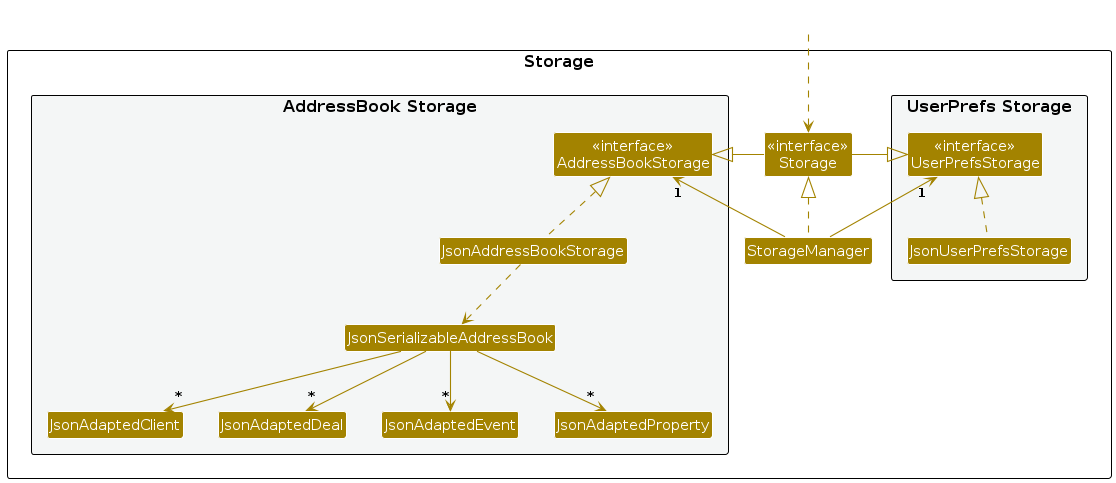
The Storage component,
- can save both address book data and user preference data in JSON format, and read them back into corresponding objects.
- inherits from both
AddressBookStorageandUserPrefStorage, which means it can be treated as either one (if only the functionality of only one is needed). - depends on some classes in the
Modelcomponent (because theStoragecomponent's job is to save/retrieve objects that belong to theModel)
Common classes
Classes used by multiple components are in the seedu.address.commons package.
Implementation
This section describes some noteworthy details on how certain features are implemented.
Feature 1: Autocompletion of command names and prefixes
This is done in 2 parts mainly:
- The
CommandBoxclass is responsible for listening to changes to the user input and displaying the autocomplete suggestions based on that. - The
LogicManagerclass is responsible for providing the list of possible commands and prefixes to theCommandBox.
The CommandBox class listens to the user input and checks if the input matches any of the commands or prefixes. If it does, it displays the suggestions in a dropdown list.
The user can then select one of the suggestions to autocomplete their command.
It has access to the command word to prefix mappings in the main Command class. However, since it's troublesome to main a hardcoded list of command words in the Command class,
each concrete subclass of Command is responsible for adding its own command word and prefixes. This is done by implementing the public static void addCommandWord() method in
each subclass.
Notice that the method is declared as static and public. This is because it is the LogicManager class that calls this method for all concrete command classes. It uses the Reflection
API to find all concrete command classes and calls the addCommandWord() method on each of them during runtime before the Ui is loaded.
This is the implementation for running the addCommandWord() method in the LogicManager class:
private void initialiseCommandWords() {
    Reflections reflections = new Reflections("seedu.address.logic.commands");
    Set<Class<? extends Command>> commandClasses = reflections.getSubTypesOf(Command.class);
    for (Class<? extends Command> commandClass : commandClasses) {
        boolean isAbstract = Modifier.isAbstract(commandClass.getModifiers());
        if (!isAbstract) {
            try {
                Method addCommandWord = commandClass.getDeclaredMethod("addCommandWord");
                boolean isStatic = Modifier.isStatic(addCommandWord.getModifiers());
                boolean isPublic = Modifier.isPublic(addCommandWord.getModifiers());
                if (isStatic && isPublic) {
                    addCommandWord.invoke(null);
                } else {
                    throw new RuntimeException(commandClass.getSimpleName()
                        + " does not have a public static addCommandWord method");
                }
            } catch (NoSuchMethodException e) {
                throw new RuntimeException(commandClass.getSimpleName()
                    + " does not have a public static addCommandWord method", e);
            } catch (Exception e) {
                if (e instanceof RuntimeException) {
                    throw (RuntimeException) e;
                }
                logger.warning("Error invoking addCommandWord in " + commandClass.getSimpleName() + ": " + e);
            }
        }
    }
}
As you can see, it's implemented in such a way that if any of the command classes do not implement the addCommandWord() method correctly,
the app will throw a runtime exception and crash. This is to ensure that the command words are always in sync with the command classes.
Feature 2: Enabling the conjunction (AND) and disjunction (OR) of filtering parameters for find commands
The find commands in the app allow users to search for clients, properties, deals and events using multiple parameters. Instead of using either the conjunction or disjunction as the default for combining the parameters, we give the user the option to choose between the two. That is to say, the user can choose to use either the conjunction or disjunction to combine the parameters but they must use the same type for all parameters except the first.
To enable this feature, we use a special ConnectivePrefix class to add this functionality. Connective prefixes are special prefixes
that can be used to combine multiple parameters in a command. If a prefix can be connective (i.e. used in a find command), it can take 3 forms:
its regular form (e.g. after/), its connective AND form (e.g. AND_after/) and its connective OR form (e.g. OR_after/).
The processing of the connective prefixes is done in the abstract FindCommandParser class.
Here is one such method that checks if the prefixes used in any of the find commands are valid:
protected static void checkPrefixesUsedAreValid(List<Prefix> prefixesUsed) throws ParseException {
    List<Prefix> validPrefixes = prefixesUsed.stream()
        .filter(prefix -> !prefix.getPrefix().isEmpty())
        .toList();

    if (validPrefixes.isEmpty()) {
        throw new ParseException("No valid prefixes used");
    }

    Prefix firstPrefix = validPrefixes.get(0);
    if (firstPrefix.isConnective()) {
        throw new ParseException("First prefix used cannot be connective");
    }

    boolean allAnd = true;
    boolean allOr = true;
    for (int i = 1; i < validPrefixes.size(); i++) {
        Prefix currentPrefix = validPrefixes.get(i);
        if (!currentPrefix.isConnective()) {
            throw new ParseException("Subsequent prefixes used after the first must be connective");
        }
        if (currentPrefix.isAndPrefix()) {
            allOr = false;
        } else if (currentPrefix.isOrPrefix()) {
            allAnd = false;
        }
    }

    if (!allAnd && !allOr) {
        throw new ParseException("Cannot mix AND and OR connective prefixes");
    }
}
Documentation, logging, testing, configuration, dev-ops
Appendix: Requirements
Product scope
Target user profile: Real Estate agents who
- need to connect clients (e.g. buyers, sellers, investors) with the best opportunities based on market demands and property locations.
- has a need to manage a significant number of contacts
- prefer desktop apps over other types
- can type fast
- prefers typing to mouse interactions
- is reasonably comfortable using CLI apps
Value proposition:
Our product provides the user with easier real estate networking by having an organised contact log that can be managed faster than a typical mouse/GUI driven app. Its intuitive design organises industry contacts and scheduling. Less time would be spent on such administrative tasks, and more could be spent on closing deals and strengthening their network.
User stories
Priorities: High (must have) - * * *, Medium (nice to have) - * *, Low (unlikely to have) - *
| Priority | As a … | I want to … | So that I can… |
|---|---|---|---|
* * * | real estate agent | add property details | offer more property listings to attract potential buyers |
* * * | real estate agent | remove property details | keep my available listings relevant |
* * | real estate agent | edit property details | update incorrect or outdated information |
* * * | real estate agent | store all the property details in one place | showcase the list of properties that I have to potential buyers |
* * * | real estate agent | add client contact details | easily follow up on leads and maintain relationships |
* * * | real estate agent | remove outdated client contact details | keep my records relevant and clutter-free |
* * | real estate agent | edit client contact details | ensure that phone numbers, emails and other details remain accurate |
* * * | real estate agent | store all my client contacts in one place | easily access and manage them |
* * * | real estate agent | add scheduled meetings with clients | efficiently manage my daily appointments |
* * * | real estate agent | delete scheduled meetings | free up time for other appointments |
* * | real estate agent | edit scheduled meetings | adjust timing when clients request changes |
* * * | real estate agent | be able to track my scheduled meetings | plan my time effectively |
* * | real estate agent | update the status of property deals (e.g., pending, closed, open) | stay updated on ongoing transactions and plan my next actions |
* | real estate agent | filter properties based on location | find properties that match location preferences of clients quickly |
* | real estate agent | filter properties based on price | find properties that match clients' budgets quickly |
* * | busy real estate agent | sort my client meetings in chronological order | prioritize the upcoming meetings first |
* * * | real estate agent | search clients by their names | view their contact details easily |
(More to be added)
Use cases
(For all use cases below, the System is the REconnect and the Actor is the user, unless specified otherwise)
Use case: Add Client Contact Details
Actor: User (Real Estate Agent)
Preconditions: The system is running.
MSS
- User requests to add a new contact and provides contact details.
- System validates input.
- System stores contact.
- System informs user the outcome of the addition.
Use case ends.
Extensions
2a. System detects missing or incorrect fields.
2a1. System prompts the user to complete them.
2a2. User enters new data.
Steps 2a1-2a2 are repeated until the data entered is correct.
Use case resumes at step 3.
3a. System fails to store the contact details.
3a1. System displays an error message.
Use case ends.
Use case: Remove Client Contact Details
Actor: User (Real Estate Agent)
Preconditions: The system is running.
MSS
- User selects the contact to be removed.
- System requests user for confirmation.
- System removes the contact.
- System informs user the outcome of the deletion.
Use case ends.
Extensions
3a. System fails to delete the contact.
3a1. System displays an error message.
Use case ends.
Use case: Edit Client Contact Details
Actor: User (Real Estate Agent)
Preconditions: The system is running.
MSS
- User requests to edit an existing contact and provides contact details.
- System validates input.
- System updates contact.
- System informs user the outcome of the edition.
Use case ends.
Extensions
2a. System detects missing or incorrect fields.
2a1. System prompts the user to complete them.
2a2. User enters new data.
Steps 2a1-2a2 are repeated until the data entered is correct.
Use case resumes at step 3.
3a. System fails to update the contact details.
3a1. System displays an error message.
Use case ends.
Use case: Find Client Contact
Actor: User (Real Estate Agent)
Preconditions: The system is running.
MSS
- User requests to find an existing contact and provides criteria for name, phone, email, and/or address.
- System validates input.
- System returns a list of relevant contacts.
Use case ends.
Extensions
2a. System detects missing or incorrect fields.
2a1. System prompts the user to complete them.
2a2. User enters new data.
Steps 2a1-2a2 are repeated until the data entered is correct.
Use case resumes at step 3.
3a. System fails to find the clients with the input criteria.
3a1. System displays an empty list.
Use case ends.
Use case: List Clients
Actor: User (Real Estate Agent)
Preconditions: The system is running.
MSS
- User requests to list all clients.
- System displays all clients in the address book.
Use case ends.
Use case: Add Property Listing Details
Actor: User (Real Estate Agent)
Preconditions: The system is running.
MSS
- User requests to add a new property listing and provides property listing details.
- System validates input.
- System stores property listing.
- System informs user the outcome of the addition.
Use case ends.
Extensions
2a. System detects missing or incorrect fields.
2a1. System prompts the user to complete them.
2a2. User enters new data.
Steps 2a1-2a2 are repeated until the data entered is correct.
Use case resumes at step 3.
3a. System fails to store the property listing details.
3a1. System displays an error message.
Use case ends.
Use case: Remove Property Listing Details
Actor: User (Real Estate Agent)
Preconditions: The system is running.
MSS
- User selects the property listing to be removed.
- System requests user for confirmation.
- System removes the listing.
- System informs user the outcome of the deletion.
Use case ends.
Extensions
3a. System fails to delete the property listing.
3a1. System displays an error message.
Use case ends.
Use case: Edit Property Listing Details
Actor: User (Real Estate Agent)
Preconditions: The system is running.
MSS
- User requests to edit an existing property and provides property listing details.
- System validates input.
- System updates property listing.
- System informs user the outcome of the edition.
Use case ends.
Extensions
2a. System detects missing or incorrect fields.
2a1. System prompts the user to complete them.
2a2. User enters new data.
Steps 2a1-2a2 are repeated until the data entered is correct.
Use case resumes at step 3.
3a. System fails to update the property details.
3a1. System displays an error message.
Use case ends.
Use case: Find Property Listing
Actor: User (Real Estate Agent)
Preconditions: The system is running.
MSS
- User requests to find an existing property listing and provides criteria for name keywords, address, price, size, and/or owner.
- System validates input.
- System returns a list of relevant property listings.
Use case ends.
Extensions
2a. System detects missing or incorrect fields.
2a1. System prompts the user to complete them.
2a2. User enters new data.
Steps 2a1-2a2 are repeated until the data entered is correct.
Use case resumes at step 3.
3a. System fails to find the property listings with the input criteria.
3a1. System displays an empty list.
Use case ends.
Use case: List Properties
Actor: User (Real Estate Agent)
Preconditions: The system is running.
MSS
- User requests to list all properties.
- System displays all properties in the address book.
Use case ends.
Use case: Add Deal
Actor: User (Real Estate Agent)
Preconditions: The system is running and has at least one property and one client.
MSS
- User requests to add a new deal by providing property ID, buyer ID, price, and optional status.
- System validates the input and checks if the property is available for a deal.
- System automatically sets the seller based on the property owner.
- System creates and stores the new deal.
- System informs user the outcome of the addition.
Use case ends.
Extensions
2a. System detects invalid property ID or buyer ID.
2a1. System displays an error message.
Use case ends.
2b. Property is already involved in another deal.
2b1. System displays an error message.
Use case ends.
2c. Buyer and seller are the same person.
2c1. System displays an error message.
Use case ends.
2d. Price format is invalid.
2d1. System displays an error message.
Use case ends.
Use case: Update Deal
Actor: User (Real Estate Agent)
Preconditions: The system is running and has at least one deal.
MSS
- User requests to update an existing deal by providing the deal index and the fields to update.
- System validates the input.
- System updates the deal with the new information.
- System informs user the outcome of the update.
Use case ends.
Extensions
2a. System detects invalid deal index.
2a1. System displays an error message.
Use case ends.
2b. User attempts to manually update the seller.
2b1. System displays an error message.
Use case ends.
2c. Updated deal would violate data constraints.
2c1. System displays an error message.
Use case ends.
Use case: List Deals
Actor: User (Real Estate Agent)
Preconditions: The system is running.
MSS
- User requests to list all deals.
- System displays all deals in the address book.
Use case ends.
Use case: Find Deal
Actor: User (Real Estate Agent)
Preconditions: The system is running.
MSS
- User requests to find deals by providing search criteria (property name, buyer name, seller name, status, price above, or price below).
- System displays a list of deals matching the criteria.
Use case ends.
Extensions
1a. No deals match the search criteria.
1a1. System displays an empty list.
Use case ends.
Use case: Add Event to Schedule
Actor: User (Real Estate Agent)
Preconditions: The system is running.
MSS
- User requests to add a new event and provides event details.
- System validates input.
- System checks for clashes in schedule.
- System adds the event to the schedule.
- System informs user the outcome of the addition.
Use case ends.
Extensions
2a. System detects missing or incorrect fields.
2a1. System prompts the user to complete them.
2a2. User enters new data.
Steps 2a1-2a2 are repeated until the data entered is correct.
Use case resumes at step 3.
3a. Meeting clashes with the existing schedule.
3a1. System prompts the user to choose a different date or time.
3a2. User enters new data.
Use case resumes at step 2.
4a. System fails to store the event details.
4a1. System displays an error message.
Use case ends.
Use case: Edit Event Details
Actor: User (Real Estate Agent)
Preconditions: The system is running.
MSS
- User requests to edit an event and provides event details.
- System validates input.
- System checks for clashes in schedule.
- System adds the event to the schedule.
- System informs user the outcome of the edition.
Use case ends.
Extensions
2a. System detects missing or incorrect fields.
2a1. System prompts the user to complete them.
2a2. User enters new data.
Steps 2a1-2a2 are repeated until the data entered is correct.
Use case resumes at step 3.
3a. Meeting clashes with the existing schedule.
3a1. System prompts the user to choose a different date or time.
3a2. User enters new data.
Use case resumes at step 2.
4a. System fails to update the event details.
3a1. System displays an error message.
Use case ends.
Use case: Delete Event
Actor: User (Real Estate Agent)
Preconditions: The system is running.
MSS
- User selects the event to be deleted.
- System requests user for confirmation.
- System deletes the event.
- System informs user the outcome of the deletion.
Use case ends.
Extensions
3a. System fails to delete the event.
4a1. System displays an error message.
Use case ends.
Use case: Find Event
Actor: User (Real Estate Agent)
Preconditions: The system is running.
MSS
- User requests to find an existing event and provides criteria for event type, date and time, client name, and/or property name.
- System validates input.
- System returns a list of relevant events.
Use case ends.
Extensions
2a. System detects missing or incorrect fields.
2a1. System prompts the user to complete them.
2a2. User enters new data.
Steps 2a1-2a2 are repeated until the data entered is correct.
Use case resumes at step 3.
3a. System fails to find the events with the input criteria.
3a1. System displays an empty list.
Use case ends.
Use case: List Events
Actor: User (Real Estate Agent)
Preconditions: The system is running.
MSS
- User requests to list all events.
- System displays all deals in the address book.
Use case ends.
Use case: List All
Actor: User (Real Estate Agent)
Preconditions: The system is running.
MSS
- User requests to list everything from all four categories.
- System displays all everything in the address book.
Use case ends.
Non-Functional Requirements
- The system must process all user commands within 2 seconds.
- The system must be able to run on different operating systems like Linux, Windows and MacOS.
- The system should be able to support up to 10000 contact details, property listings and meeting schedules each without a noticeable degradation in performance.
- The system must not lose or corrupt contact data under normal conditions.
- The program will not send automated tasks like periodic reminders.
- The system should be intuitive so that a new user can quickly learn how to use it.
(More to be added)
Glossary
Address Book: A digital storage system that manages client contacts and related information.
Agent: A licensed professional responsible for managing client contacts and facilitate real estate transactions.
AND Connective: A logical operator used in find commands (prefixed as AND_) that requires all specified conditions to be true for a match to be returned.
Buyer: A client who purchases a property in a deal transaction.
Case-insensitive: A property of string comparison where uppercase and lowercase letters are treated as equivalent (e.g., "Villa" matches "villa", "VILLA", etc.).
Client: Anyone who intends to buy, sell or invest in real estate that interacts with an agent regarding their prospective real estate transactions.
Command: A text instruction entered by the user to perform a specific action in the application (e.g., add_deal, find_client).
Command-Line Interface (CLI): A text-based user interface that allows users to interact with the system by typing commands.
Connective Prefix: A prefix that can be combined with logical connectives (AND, OR) to form compound arguments in commands.
Contact Details: Information including name, phone number, email, and/or other personal details of a client.
Deal: A property transaction record that tracks the relationship between a property, its seller (property owner), a buyer, the agreed price, and the current status of the transaction.
Deal Status: The current status of a property transaction which falls into three categories: Pending, Closed, or Open.
Event: A scheduled activity or appointment related to real estate transactions.
Event Type: The category of an event, such as client meetings, workshops, conferences, or any other relevant activities.
Graphical User Interface (GUI): A visual way of interacting with a computer using items such as windows, icons, and menus, operated by a mouse or touchscreen.
Index: A number used to refer to a specific item in a displayed list. In REconnect, indexes are 1-based (start from 1) and shown to the left of each item in the list.
JAR file: A Java Archive file (with .jar extension) that packages multiple Java class files and resources into a single file for distribution.
OR Connective: A logical operator used in find commands (prefixed as OR_) that requires at least one of the specified conditions to be true for a match to be returned.
Parameter: A piece of information provided to a command, typically in the format prefix/VALUE, such as price/2000.
Positive Integer: A whole number greater than zero (1, 2, 3, etc.).
Prefix: A keyword followed by a forward slash (/) that indicates the type of information being provided in a command, such as pid/ for property ID.
Property ID (pid): A reference number used to identify a specific property in the property list.
Property Listing: A collection of information about a property available for sale.
Property Viewing: A scheduled meeting between the real estate agent and a client to inspect a property.
Result Display: The area in the GUI that shows the outcome of executing a command, including success messages and error messages.
Seller: The owner of a property who is selling it in a deal transaction.
Test Case: A specific set of conditions, inputs, and expected outcomes used to verify that a particular feature works correctly.
Terminal: A text-based interface program that allows users to interact with the operating system by entering commands.
Appendix: Planned Enhancements
Allow for other valid phone number formats (e.g.,
+65 8287 2001,65-8287-2001, etc.) to be accepted.Improve validation for emails for clients.
- Currently, the regex used for email validation is not comprehensive and can be improved to cover more edge cases.
- E.g. alex@55.533 is considered valid, but it should not be.
- E.g. alex@emailcom is considered valid, but it should not be.
Improve validation for addresses for clients and properties.
- Currently, any non-empty string is considered valid.
- E.g. 1234 is considered valid, but it should not be.
- E.g. @%%@% is considered valid, but it should not be.
Add support for more complex date and time formats in the event scheduling feature.
- Currently, only
dd-MM-yyyy HHmmformat are supported. - E.g.
dd/MM/yyyy HH:mmis not supported.
- Currently, only
Allow substring matching for client and property names in the find commands.
- Currently, only keyword matching is supported.
- E.g.
find_client name_keywords/Johwill not matchJohn Doe, but it's better if it does.
Allow optional parameters when adding events.
- Currently, parameters such as
cidandpidare compulsory. This may not make sense for some event types likeworkshoporothers. - Some parameters can be made optional for certain event types.
- Currently, parameters such as
Properties with different property names but same address can be added.
- Currently, only properties with same names will be counter as duplicate.
- Eg. Address of property A with name "Maple Villa" is "321 Clementi Avenue 1, #11-11" and of property B with name "Sunset Villa" is "321 Clementi Avenue 1, #11-11", yet both property listings can coexist in REConnect, which should not be the case.
- Validation for exact same address will be done in the future.
Appendix: Instructions for manual testing
Given below are instructions to test the app manually.
Note: These instructions only provide a starting point for testers to work on; testers are expected to do more exploratory testing.
Launch and shutdown
Initial launch
Download the jar file and copy into an empty folder
Double-click the jar file Expected: Shows the GUI with a set of sample contacts. The window size may not be optimum.
Saving window preferences
Resize the window to an optimum size. Move the window to a different location. Close the window.
Re-launch the app by double-clicking the jar file.
Expected: The most recent window size and location is retained.
Client management
Adding a client
Test case:
add_client name/John O'Doe phone/82872001
Expected: A new client is added with the name "John O'Doe", phone number "82872001", email and address as "(blank)". A success message is shown.Test case:
add_client name/John S/O Doe phone/82872001
Expected: A new client is added with the name "John S/O Doe", phone number "82872001", email and address as "(blank)". A success message is shown.Test case:
add_client name/John S\O Doe phone/82872001
Expected: A new client is added with the name "John S\O Doe", phone number "82872001", email and address as "(blank)". A success message is shown.Test case:
add_client name/John Mo phone/72872001
Expected: An error message is shown indicating that the phone number is invalid.Test case:
add_client name/John Mo phone/828720019
Expected: An error message is shown indicating that the phone number is invalid.Test case:
add_client name/John Doe phone/98765432 email/johnd@example.com
Expected: A new client is added with the name "John Doe", phone number "98765432", email "johnd@example.com" and address as "(blank)". A success message is shown.Test case:
add_client name/John Moe phone/98765432 email/johnd_9+0-0.0@example.com
Expected: A new client is added with the name "John Moe", phone number "98765432", email "johnd_9+0-0.0@example.com" and address as "(blank)". A success message is shown.Test case:
add_client name/John Moe phone/98765432 email/johnd_+-.0@example.com
Expected: An error message is shown indicating that the email is invalid.Test case:
add_client name/Jo Doe phone/98765432 addr/311, Clementi Ave 2, #02-25
Expected: A new client is added with the name "Jo Doe", phone number "98765432", email "(blank)" and address as "311, Clementi Ave 2, #02-25". A success message is shown.Test case:
add_client name/Joe Doe phone/98765432 email/johnd@example.com addr/311, Clementi Ave 2, #02-25
Expected: A new client is added with the name "Joe Doe", phone number "98765432", email "johnd@example.com" and address as "311, Clementi Ave 2, #02-25". A success message is shown.
Editing a client
Prerequisites: There must be at least one client in the client list. Use the
list_clientscommand to verify this and note its index.Test case:
edit_client 1 name/John Doe
Expected: The client at index 1 is updated with the name "John Doe". A success message is shown.Test case:
edit_client 1 phone/82872001
Expected: The client at index 1 is updated with the phone number "82872001". A success message is shown.Test case:
edit_client 1 email/johnd@example.com
Expected: The client at index 1 is updated with the email "johnd@example.com". A success message is shown.Test case:
edit_client 1 addr/311, Clementi Ave 2, #02-25
Expected: The client at index 1 is updated with the address "311, Clementi Ave 2, #02-25". A success message is shown.Test case:
edit_client 1 name/John Doe phone/82872001 email/johnd@example.com addr/311, Clementi Ave 2, #02-25
Expected: The client at index 1 is updated with the name "John Doe", phone number "82872001", email "johnd@example.com", and address "311, Clementi Ave 2, #02-25". A success message is shown.Test case:
edit_client 1 phone/72872001
Expected: An error message is shown indicating that the phone number is invalid.Test case:
edit_client 1 email/johnd_+-.0@example.com
Expected: An error message is shown indicating that the email is invalid.Test case:
edit_client 999 name/John Doe
Expected: An error message is shown indicating that the client index is invalid (out of the range of the current client list).Test case:
edit_client 1
Expected: An error message is shown indicating that no fields to edit were provided.
Finding a client
Prerequisites: There must be multiple clients with different names, phone numbers, emails, and addresses. To properly test all cases, ensure you have:
- At least one client with "Alice" in their name (e.g., "Alice Tan")
- At least one client with "Bob" in their name (e.g., "Bob Lee")
- At least one client with the phone number "12345678"
- At least one client with the email "alice@example.com"
- At least one client with the address "123, Clementi Ave 3"
Test case:
find_client name_keywords/Alice
Expected: Displays clients with names containing "Alice" if present.Test case:
find_client phone/1234
Expected: Displays clients with the phone number "12345678".Test case:
find_client email/alice
Expected: Displays clients with the email "alice@example.com".Test case:
find_client address/Clementi
Expected: Displays clients with the address "123, Clementi Ave 3".Test case:
find_client keywords/Alice AND_phone/5678
Expected: Displays clients with names containing "Alice" and phone number "12345678".Test case:
find_client keywords/Bob OR_email/xample.com
Expected: Displays clients with names containing "Bob" or email "alice@example.com".Test case:
find_client nonexistent/keyword
Expected: Invalid command format. Error message shown.Test case:
find_client name_keywords/NonexistentName
Expected: No clients found. Result display shows "0 clients listed!".Test case:
find_client name_keywords/Alice AND_phone/99999999
Expected: No clients found. Result display shows "0 clients listed!".
Deleting a client
Prerequisites: There must be at least one client in the client list. Use the
list_clientscommand to verify this and note its index.Test case:
delete_client 1
Expected: The client at index 1 is deleted. A success message is shown.Test case:
delete_client 999
Expected: An error message is shown indicating that the client index is invalid.Test case:
delete_client 1 1 1
Expected: An error message is shown indicating that the client index is invalid.
Listing clients
Prerequisites: The client list has been filtered using
find_client.Test case:
list_clients
Expected: All clients are displayed, showing the complete, unfiltered list.Test case:
list_clients extra_argument
Expected: Invalid command format. Error message shown.
Property management
Adding a property
Test case:
add_property prop/Sunset Villa owner/1 addr/123 Sunset Way price/150
Expected: A new property is added with the name "Sunset Villa", owner as client at index 1, address "123 Sunset Way", price "$150k", size and description as "-". A success message is shown in the results display.Test case:
add_property prop/Ocean@Front owner/2 addr/456 Beach Blvd price/1200 size/1000 desc/Beautiful sea view
Expected: A new property is added with the name "Ocean@Front", owner as client at index 2, address "456 Beach Blvd", price "$1200k", size "1000 square feet" and description "Beautiful sea view". A success message is shown in the results display.Test case:
add_property prop/@@Villa owner/2 addr/789 Sea St price/900
Expected: An error message is shown in the result display as property name cannot begin with special characters.Test case:
add_property prop/Maple Villa owner/99 addr/123 Maple Street price/500
Expected: An error message is shown in the result display indicating invalid owner ID.Test case:
add_property prop/Maple Villa owner/1 addr/123 Maple Street price/-50
Expected: An error message is shown in the result display indicating price must be a positive integer in thousands.Test case:
add_property prop/Maple Villa owner/1 addr/123 Maple Street price/150 size/10
Expected: An error message is shown in the result display indicating size must be between 100 and 99999.Test case:
add_property prop/Maple Villa owner/1 addr/123 Maple Street price/150 desc/A very very very long description exceeding fifty characters
Expected: An error message is shown in the result display indicating description must be 1-50 characters.Test case:
add_property prop/Maple Villa owner/1 addr/123 Maple Street
Expected: An error message is shown in the result display indicating invalid command format as price is a required field.
Editing a property
Prerequisites: There must be at least one client in the client list. Use the
list_propertiesto verify this and note its index.Test case:
edit_property 1 prop/New Name
Expected: The property at index 1 is updated with the name "New Name". A success message is shown in the result display.Test case:
edit_property 1 price/2000 size/1200 desc/Renovated
Expected: The property at index 1 is updated with the price "$2000k", size "1200 square feet" and description "Renovated". A success message is shown in the result display.Test case:
edit_property 1 owner/3
Expected: The owner of the property at index 1 is updated with the client at index 3. A success message is shown in the result display.Test case:
edit_property 1 price/abcd
Expected: An error message is shown in the result display indicating price must be an integer.Test case:
edit_property 1 prop/@@Invalid
Expected: An error message is shown in the result display as property name cannot begin with special characters.Test case:
edit_property 99 price/1000
Expected: An error message is shown in the result display indicating invalid property index.Test case:
edit_property 1
Expected: An error message is shown in the result display indicating that at least one field to edit must be provided.
Finding a property
Prerequisites: There must be multiple property listings with different names, owners, addresses, sizes and descriptions.; To properly test all cases, ensure you have:
At least one property with "Villa" in their name (e.g., "Maple Villa");
At least one property with "Alice" in its owner name
At least one property with "Sunset" in their address
At least one property with price above $500k
At least one property with price below $200k
At least one property with size above 1000 square feet
At least one property with description "Beautiful"
Test case:
find_property name_keywords/Villa
Expected: Displays properties whose names contain the word "Villa".Test case:
find_property owner/Alice
Expected: Displays properties owned by a client whose name includes "Alice".Test case:
find_property addr/Sunset
Expected: Displays properties whose addresses contain the word "Sunset".Test case:
find_property price_>/500
Expected: Displays properties priced above $500k.Test case:
find_property price_</200
Expected: Displays properties priced below $200k.Test case:
find_property size_>/1000
Expected: Displays properties with size above 1000 square feet.Test case:
find_property addr/Sunset AND_price_>/500
Expected: Displays properties with addresses containing "Sunset" and priced above $500k.Test case:
find_property name_keywords/Villa OR_price_</200
Expected: Displays properties whose names contain the word "Villa" or priced below $200k.Test case:
find_property price_>/abc
Expected: An error message is shown in the result display indicating price must be an integer.Test case:
find_property name_keywords/NonexistentNameExpected: No properties found. Result display shows "0 properties are found and listed here!".
Deleting a property
Prerequisites: There must be at least one property in the property list. Use the
list_propertiescommand to verify this and note its index.Test case:
delete_property 1
Expected: The property at index 1 is deleted. A success message is shown in the result display.Test case:
delete_property 999
Expected: An error message is shown in the result display indicating that the property index is invalid.Test case:
delete_property 1 1 1
Expected: An error message is shown in the result display indicating that the property index is invalid.
Listing properties
Prerequisites: The property list has been filtered using
find_property.Test case:
list_properties
Expected: All properties are displayed, showing the complete, unfiltered list.Test case:
list_properties extra_argumentExpected: An error message is shown in the result display indicating invalid command format.
Deal management
Adding a deal
Prerequisites: There must be at least one property and one client in the respective lists. Use the
list_propertiesandlist_clientscommands to verify this and note their indexes. Important: Since deals cannot be deleted, you will need a different property for each add_deal test. Consider adding multiple properties before testing using theadd_propertycommand.Test case:
add_deal pid/1 buyer/1 price/2000 status/OPEN
Expected: A new deal is added with the specified property, buyer, and status. The property owner is automatically set as the seller. A success message is shown.Test case:
add_deal pid/1 buyer/1 price/2000
Expected: A new deal is added with default status (PENDING). A success message is shown.Test case:
add_deal pid/999 buyer/1 price/2000
Expected: An error message is shown indicating that the property ID is invalid (out of the range of the current property list).Test case:
add_deal pid/1 buyer/999 price/2000
Expected: An error message is shown indicating that the buyer ID provided is invalid (out of the range of the current client list).Test case:
add_deal pid/1 buyer/1 price/1
Expected: An error message is shown indicating that price must be between 3 and 6 digits.Other incorrect add_deal commands to test:
add_deal pid/a buyer/1 price/2000: Non-integer property IDadd_deal pid/1 buyer/b price/2000: Non-integer buyer IDadd_deal pid/1 buyer/1 price/2000 status/invalid: Invalid status (not OPEN, PENDING, or CLOSED)add_deal pid/1 buyer/1 price/2000000: Price exceeds 6 digitsadd_deal: Missing all required fields
Expected: Similar to previous test cases. Error messages specific to the invalid input are shown.
Updating a deal
Prerequisites: There must be at least one deal in the deal list. Use the
list_dealscommand to verify this and note its index.Test case:
update_deal 1 status/CLOSED
Expected: The status of the first deal is updated to CLOSED. A success message is shown.Test case:
update_deal 1 price/3000
Expected: The price of the first deal is updated to $3000k. A success message is shown.Test case:
update_deal 1 buyer/2
Expected: The buyer of the first deal is updated to the client at index 2 (if it exists). A success message is shown.Test case:
update_deal 0 status/CLOSED
Expected: An error message is shown indicating that index must be a positive integer.Test case:
update_deal 999 status/CLOSED
Expected: An error message is shown indicating that the index is invalid.Other incorrect update_deal commands to test:
update_deal 1 pid/999: Invalid property IDupdate_deal 1 buyer/999: Invalid buyer IDupdate_deal 1 status/invalid: Invalid statusupdate_deal 1: Missing all optional fields
Expected: Similar to previous test cases. Error messages specific to the invalid input are shown.
Finding a deal
Prerequisites: There must be multiple deals with different properties, buyers, sellers, prices, and statuses. To properly test all cases, ensure you have:
- At least one property with "Villa" in its name (e.g., "Maple Villa")
- At least one property with "Ocean" in its name (e.g., "Ocean View")
- At least one deal with status "CLOSED" and one with "PENDING"
- At least one deal with a buyer named "John" and a seller named "Mary"
- Deals with various prices (e.g., above $2000k, below $5000k)
Test case:
find_deal prop/Villa
Expected: Displays deals with properties containing "Villa" in their names if present.Test case:
find_deal status/CLOSED
Expected: Displays all deals with status CLOSED.Test case:
find_deal buyer/John AND_seller/Mary
Expected: Displays deals with buyers containing "John" and sellers containing "Mary".Test case:
find_deal prop/Ocean OR_status/PENDING
Expected: Displays deals with properties containing "Ocean" or with PENDING status.Test case:
find_deal price_>/2000
Expected: Displays deals with prices above $2000k.Test case:
find_deal price_</5000
Expected: Displays deals with prices below $5000k.Test case:
find_deal nonexistent/keyword
Expected: Invalid command format. Error message shown.Test case:
find_deal prop/NonexistentProperty
Expected: No deals found. Result display shows "0 deals listed!".Test case:
find_deal prop/Villa AND_price_>/10000000
Expected: An error message is shown indicating that price must be between 3 and 6 digits.
Listing deals
Prerequisites: The deal list has been filtered using
find_deal.Test case:
list_deals
Expected: All deals are displayed, showing the complete, unfiltered list.Test case:
list_deals extra_argument
Expected: Invalid command format. Error message shown.
Event management
Adding an event
Prerequisites: There must be at least one client and one property in the respective lists. Use the
list_clientsandlist_propertiescommands to verify this and note their indexes.Test case:
add_event at/30-04-2025 1700 etype/meeting cid/2 pid/1 note/Property viewing at 123 Clementi Ave 2
Expected: A new event is added with the specified state date and time, event type, client, property, and note. A success message is shown.Test case:
add_event at/30-04-2024 1700 etype/meeting cid/2 pid/1 note/N/A
Expected: An error message is shown indicating that the event is scheduled too far back in the past.Test case:
add_event at/30-04-2025 1700 etype/meeting cid/3 pid/3 note/Some other meeting
Expected: An error message is shown indicating that the event conflicts with an existing event.Test case:
add_event at/30-04-2025 1900 etype/some type cid/2 pid/1 note/N/A
Expected: An error message is shown indicating that the event type is invalid, and the accepted event types are listed.Test case:
add_event at/30-04-2025 1900 etype/meeting cid/999 pid/1 note/N/A
Expected: An error message is shown indicating that the client ID provided is invalid (out of the range of the current client list).Test case:
add_event at/30-04-2025 1900 etype/meeting cid/2 pid/999 note/N/A
Expected: An error message is shown indicating that the property ID provided is invalid (out of the range of the current property list).
Editing an event
Prerequisites: There must be at least one event in the event list. Use the
list_eventscommand to verify this and note its index.Test case:
edit_event 1 at/30-04-2025 1200 note/Changed to 12pm
Expected: The date and time of the first event is updated to 30-04-2025 at 1200. A success message is shown.Test case:
edit_event 1 etype/others
Expected: The type of the first event is updated to "Others". A success message is shown.Test case:
edit_event 1 cid/1
Expected: The client of the first event is updated to the client at index 1. A success message is shown.Test case:
edit_event 1 note/Coffee with client
Expected: The note of the first event is updated as specified. A success message is shown.Test case:
edit_event 999 at/30-04-2025 1200
Expected: An error message is shown indicating that the index provided is invalid (out of the range of the current event list).Other incorrect
edit_eventcommands to test:edit_event 1 at/30-04-2024 1700: Past date and timeedit_event 1 cid/999: Invalid client IDedit_event 1 etype/invalid: Invalid event typeedit_event 1: Missing all optional fields
Expected: Similar to previous test cases. Error messages specific to the invalid input are shown.
Finding an event
Prerequisites: There must be multiple events with different dates and times, types, clients, and properties. To properly test all cases, ensure you have:
- At least one event before 01-03-2025 0000 and after 30-04-2025 1700
- At least one event with event type "Meeting"
- At least one event with a client whose name contains "Alice" (e.g., "Alice Tan")
- At least one event with a property whose name contains "Villa" (e.g., "Maple Villa")
Test case:
find_event before/30-04-2025 1700
Expected: Displays events before 30-04-2025 1700.Test case:
find_event after/01-03-2025 0000
Expected: Displays events after 01-03-2025 0000.Test case:
find_event after/01-03-2025 0000 AND_before/30-04-2025 1700
Expected: Displays events between 01-03-2025 0000 and 30-04-2025 1700.Test case:
find_event etype/meeting
Expected: Displays events with the type "Meeting".Test case:
find_event with/Alice
Expected: Displays events associated with clients with names containing "Alice".Test case:
find_event about/Villa
Expected: Displays events associated with properties with names containing "Villa".Test case:
find_client nonexistent/keyword
Expected: An error message is shown indicating that the prefix is invalid.
Deleting an event
Prerequisites: There must be at least one event in the event list. Use the
list_eventcommand to verify this and note its index.Test case:
delete_event 1
Expected: The event at index 1 is deleted. A success message is shown.Test case:
delete_event 999
Expected: An error message is shown indicating that the event index is invalid.Test case:
delete_event 1 1 1
Expected: An error message is shown indicating that the event index is invalid.
Listing events
Prerequisites: The event list has been filtered using
find_event.Test case:
list_events
Expected: All events are displayed, showing the complete, unfiltered list.Test case:
list_events extra_argument
Expected: Invalid command format. Error message shown.